Weather Settings
Weather related settings.
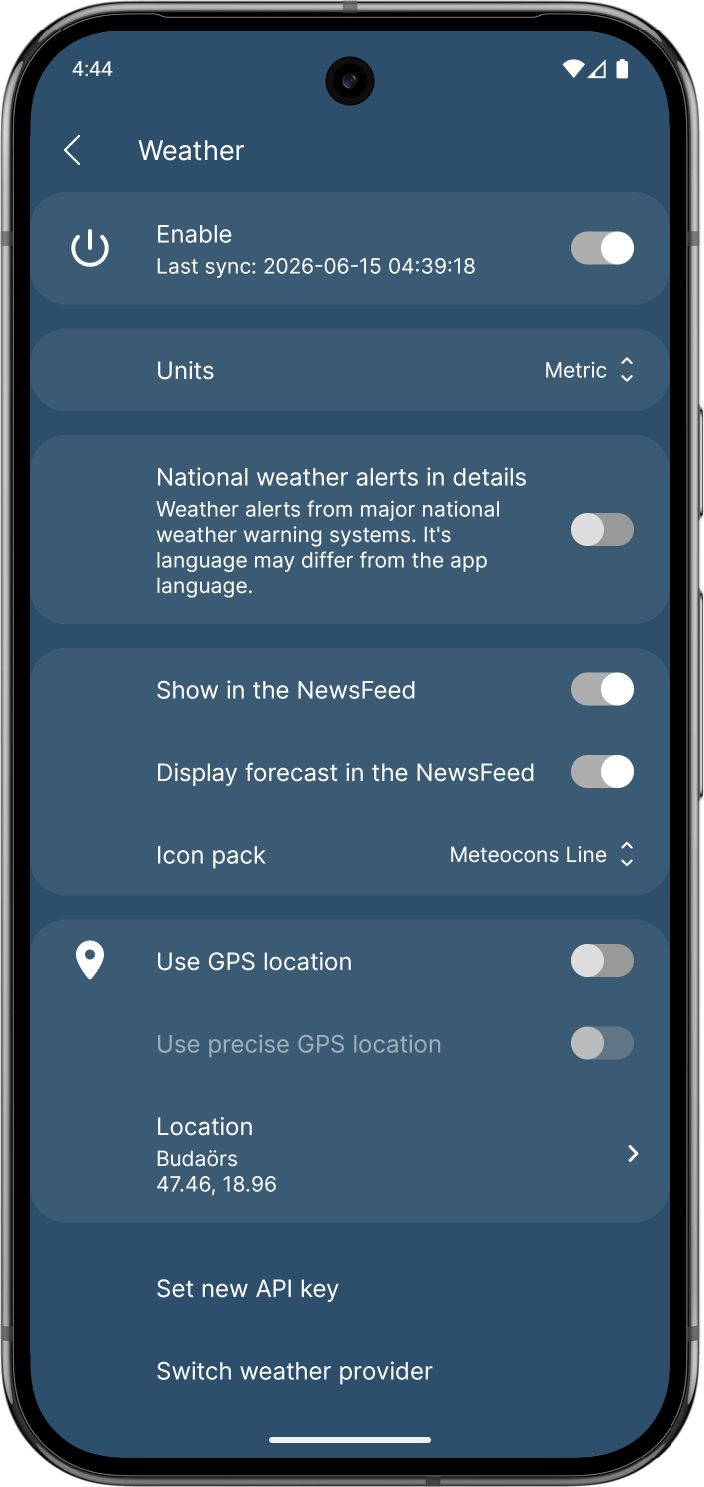
Enable
Completely enable/disable the weather related features.
Units
Choose between Metric (Celsius, km/h), Imperial (Fahrenheit, mph), or SI (Kelvin, m/s) units for temperature and wind speed display.
National weather alerts in details
Weather alerts from major national weather warning systems.
Display in the NewsFeed
Controls the visibility of the weather information in the main feed.
Display forecast in the NewsFeed
If disabled, only the current weather will be displayed.
Icon pack
Change the visual style of the weather icons. You can choose from simple lines, modern animated, or classic designs to match your home screen theme.
Use GPS location
Use GPS to determine the coordinates to request the weather information
Use precise GPS location
If enabled: Information will be requested with your precise location. Requests will include your coordinates.
If disabled: Information will be requested without your precise location. Requests will include the nearest city's coordinates.
Location
If the Use GPS location is enabled: Displays the detected GPS location.
If the Use GPS location is disabled: Displays the manually chosen coordinates. Tap on the preference to choose a new location.
Set new API key
If you are using OpenWeatherMap, you can update your API key here. This is necessary if your previous key expired or if you want to use a different subscription plan.
Switch weather provider
Switch between different weather data providers (e.g., OpenWeatherMap or MET Norway) to use the source that is most accurate or reliable for your region.